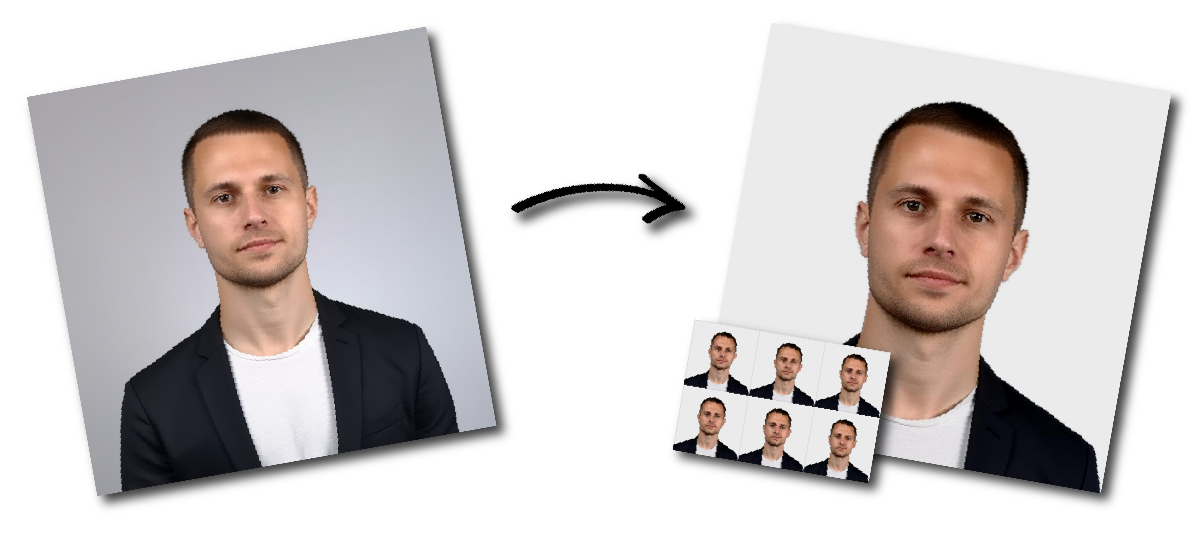

Don't worry about the size requirements. Our tool will automatically create correct United States Passport photos for you.
Renewing/Applying using a paper form:
Photo Submission Guidelines
Lighting and Shadow-Free Appearance
Photo Dimensions and Head Placement
Image Resolution and Print Quality
Facial Expression and Body Positioning
Clothing, Headwear, and Eyewear Guidelines
Clothing Restrictions
Do not wear:
- Uniforms
- Clothing that resembles a uniform
- Camouflage clothing
- Everyday clothing is required.
Hats and Head Coverings
For religious purposes: Submit a signed statement confirming that the head covering is worn daily in public as part of your faith.
For medical purposes: Submit a signed doctor’s statement confirming the head covering is worn for medical reasons.
Head coverings must not cast shadows or obscure any part of the face.
Remove all eyewear before taking your photo, including:
If you cannot remove your glasses for medical reasons, include a signed letter from your doctor with your application.
Your full face must be clearly visible: no shadows, reflections, or obstructions from glasses or accessories.
Accessories
Not allowed:
Allowed:
Background Requirements
Dimensions
Color
Format
Compression Use the highest quality camera settings to capture a high-resolution image. When saving or emailing your photo, select the largest file size or highest quality.
Do not send the image via text message, as this may compress the file and lower quality.
The photo you need depends on how you are applying or renewing your passport.
|
Application type |
Photo you need |
Main requirements |
|
Paper passport application |
Printed passport photo |
2 x 2 inches, printed on matte or glossy photo-quality paper |
|
Passport renewal by mail |
Printed passport photo |
One recent color photo attached to your paper form |
|
Online passport renewal |
Digital passport photo |
Original digital image saved on your device; JPG, JPEG, PNG, HEIC, or HEIF; 54 KB to 10 MB |
Use a printed 2 x 2 inch color photo if you are applying with a paper form or renewing by mail. The photo must be printed on matte or glossy photo-quality paper. Do not submit a photocopy, a damaged photo, or a photo with visible printer dots.
Use a digital photo if you are renewing your U.S. passport online. The image should be saved on the device you use for your application. Do not scan a printed photo or take a picture of a printed photo to create a digital file. Use the highest quality camera setting and avoid sending the photo through text message, which can reduce image quality.
You can take your U.S. passport photo at home with a phone or digital camera. Follow these steps before uploading your photo:
Do not use filters, retouching tools, beauty mode or AI image editing.
Our US passport photo tool helps you prepare a U.S. passport photo in only 3 steps:
Review the official U.S. Department of State passport photo rules.
U.S. passport photos are often rejected because the image does not meet size, quality, background, or pose requirements. Avoid these common mistakes:
If your photo has any of these issues, take a new photo before submitting your application.
Wear normal everyday clothing for your U.S. passport photo. Do not wear a uniform, clothing that looks like a uniform, or camouflage clothing.
No. Remove eyeglasses, sunglasses, and tinted glasses before taking your passport photo. If you cannot remove glasses for medical reasons, you may need to include a signed doctor’s statement with your application.
Remove hats and head coverings unless you wear one daily for religious reasons or need it for medical reasons. Your full face must be visible, and the head covering must not create shadows or hide your hairline, forehead, eyes, cheeks, chin, or jawline.
Jewelry and facial piercings are allowed if they do not hide or block any part of your face and do not cause reflections or shadows.
No. Remove headphones, earbuds, wireless hands-free devices, and similar accessories before taking your photo.
Children and babies also need passport photos that meet U.S. requirements. The photo must show the child’s face clearly, with no other person visible in the image.
For older children, both eyes should be open and visible, and the child should face the camera directly.
If you are applying with a paper form or renewing by mail, print your passport photo at 2 x 2 inches. Use matte or glossy photo-quality paper. Do not use regular office paper.
Before submitting the printed photo, check that:
The photo measures exactly 2 x 2 inches.
You can print the downloaded photo at home with photo-quality paper or use a local photo printing service. Make sure the final printed image is not stretched, compressed, or cropped incorrectly.
A printed U.S. passport photo must be 2 x 2 inches, or 51 x 51 mm. The head should measure 1 to 1 3/8 inches from the bottom of the chin to the top of the head.
Yes. You can take a U.S. passport photo with a phone if the image is clear, properly lit, in color, and taken in front of a plain white or off-white background. Use the highest quality camera setting and avoid filters or retouching.
A close-up selfie is not recommended because it can distort your face and make your head size incorrect. Ask another person to take the photo or use a tripod so you can stand several feet away from the camera.
Use a plain white or off-white background with no shadows, texture, lines, or objects.
Use a neutral expression or natural smile. Avoid showing teeth, opening your mouth, or making an exaggerated expression.
No. Remove eyeglasses, sunglasses, and tinted glasses before taking your photo unless you have a documented medical reason.
Yes. Normal makeup is allowed if it does not hide or change your facial features. Avoid heavy makeup that changes your natural appearance.
Yes. Jewelry and facial piercings are allowed if they do not cover your face, create glare, or cast shadows.
Yes, if you wear it daily for religious reasons. Your full face must be visible, and the covering must not cast shadows or hide facial features.
No. Hats are not allowed unless worn for documented religious or medical reasons.
For online renewal, accepted digital photo formats include JPG, JPEG, PNG, HEIC, and HEIF.
For online renewal, the digital photo file should be between 54 KB and 10 MB.
No. Do not scan a printed photo or take a picture of a printed photo for online renewal. Use an original digital photo.
Lay the baby on a plain white or off-white sheet, use even lighting, and make sure no other person, hand, toy, pacifier, or car seat appears in the photo. The baby’s face should be visible and facing the camera as much as possible.