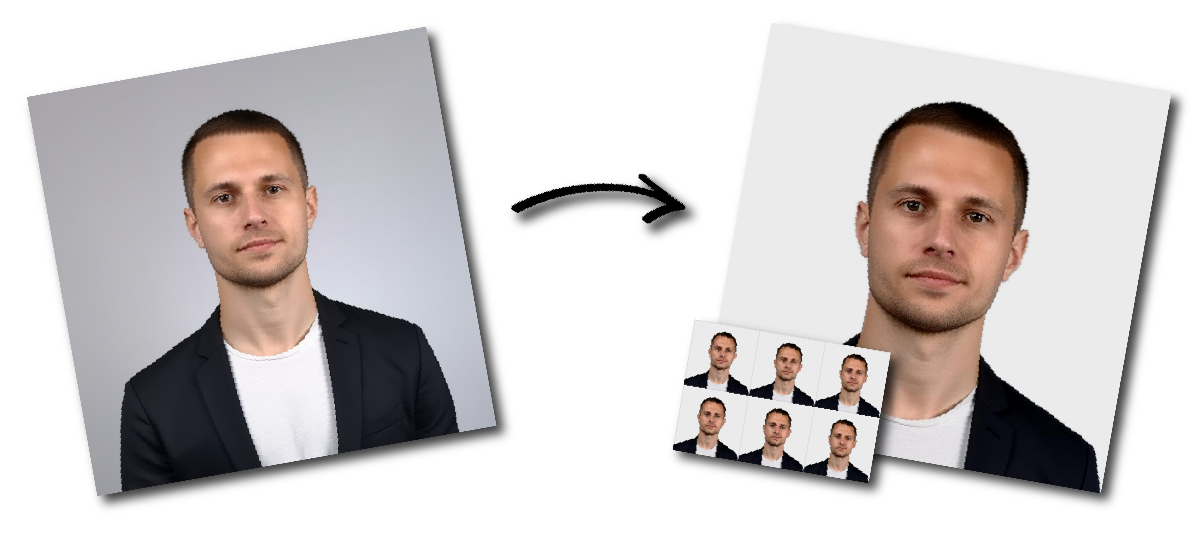

Don't worry about the size requirements. Our tool will automatically create correct United States Visa photos for you.
The photo must measure 2 inches by 2 inches, or 51 mm by 51 mm.
The applicant’s head must be centered in the image. The distance from the bottom of the chin to the top of the head must be between 1 inch and 1⅜ inches, or approximately 25 mm to 35 mm. The head should occupy between 50% and 69% of the photo’s total height.
The applicant’s full face must be visible, and no part of the face should be blocked by clothing, hair, accessories, or head coverings.
The photo must be in color and must reproduce the applicant’s natural skin tones accurately.
The image must be clear, sharp, and free from visible pixels, printer dots, blurring, or distortion.
There must not be any shadows on the applicant’s face or in the background.
The photo must have been taken within the last six months and must accurately reflect the applicant’s current appearance.
The applicant must face the camera directly in a full-face view.
The applicant’s head must not be tilted or turned.
The applicant must have a neutral facial expression, and both eyes must be open and clearly visible.
No other person may appear in the photo.
The background must be plain white or off-white.
The background must not contain shadows, textures, patterns, objects, or visible lines.
The applicant should wear clothing that is normally worn on a daily basis.
Uniforms must not be worn, except for religious clothing that is worn every day.
Clothing must not cover or block any part of the applicant’s face.
Hats and head coverings are not permitted unless they are worn daily for religious purposes or are required for medical reasons.
Any permitted head covering should be a single color and should not contain patterns or small holes.
The head covering must not obscure the applicant’s hairline or any part of the face.
The head covering must not cast shadows on the applicant’s face.
Eyeglasses are generally not permitted in new visa photos.
Eyeglasses may be allowed only in rare medical circumstances, such as when an applicant has recently undergone eye surgery and requires protective eyewear.
In such cases, the applicant must provide a signed statement from a medical professional or healthcare practitioner.
When medically necessary eyeglasses are permitted, the frames must not cover the eyes.
The lenses must not create glare, shadows, or refraction that obscures any part of the eyes.
Headphones, wireless hands-free devices, and similar items are not permitted in the photo.
Hearing devices or similar articles that are normally worn may remain in place.
Only the child may appear in the photo.
The child should face the camera with the eyes open.
For infants, it is acceptable if the eyes are not completely open.
The child’s full face must be visible, and no clothing, objects, or shadows should block the face.
The photo must be printed on high-quality glossy or matte photo paper.
The printed image must remain sharp and must not show visible pixels or printer dots.
Follow these steps before uploading your image.
Stand or sit in front of a plain white or off-white wall. Remove visible objects, decorations, patterns, and strong textures from the background.
Leave some distance between yourself and the wall to reduce shadows.
Your face should be evenly illuminated. Avoid strong light from only one side, direct overhead lighting, and bright light behind you.
Make sure:
Position the camera at eye level and several feet away. A photo taken by another person will usually provide better positioning than a close-up handheld selfie.
Keep the camera steady and use its highest available image-quality setting.
Keep your head upright and centered. Do not tilt or rotate your head.
Your shoulders should face forward, and both eyes must be open and clearly visible.
Use a natural, neutral expression. Keep your mouth closed and avoid exaggerated smiles, frowning, squinting, or raised eyebrows.
A US visa photo may be considered unacceptable for any of the following reasons.
The printed image is not exactly 2×2 inches, or the digital image is not square and within the accepted pixel range.
The head appears too large, too small, too high, or too low within the frame.
A shadow is visible on the applicant’s face, neck, or background.
The image is too dark, overexposed, or has an unnatural color cast.
The applicant’s facial features are not clear because of motion blur, poor focus, low resolution, or excessive compression.
The background is colored, patterned, textured, cluttered, or contains visible objects.
The applicant is looking sideways, looking down, tilting their head, or not facing the camera directly.
The applicant’s eyes are closed, mouth is open, or facial expression is exaggerated.
The applicant is wearing glasses without a qualifying medical reason, sunglasses, headphones, or a nonreligious hat.
Hair, clothing, shadows, accessories, or a head covering obscure part of the face or eyes.
The image contains filters, facial retouching, face reshaping, beauty effects, or another change that alters the applicant’s appearance.
The photo was taken more than six months ago or no longer represents the applicant’s current appearance.
This commonly occurs in photographs of babies when a parent’s hands, arms, or body remain visible.
The image must be saved as a JPEG file. Files saved as PNG, HEIC, WebP, PDF, or another format may not upload correctly.
The photo must be square, with a minimum size of 600×600 pixels and a maximum size of 1200×1200 pixels.
A 600×600-pixel image is normally the simplest option for an online visa application.
The file must not exceed 240 KB.
If the file is too large, reduce its dimensions or apply moderate JPEG compression. Do not compress the image so heavily that facial details become blurred or pixelated.
If the image meets all technical requirements but still fails to upload, try:
An “X” instead of your photograph means the photo upload failed.
In that situation, the Department of State instructs applicants to bring a compliant printed photo with the DS-160 confirmation page and to contact the relevant embassy or consulate for specific instructions.
When your photograph appears on the confirmation page, the upload was successful, and a separate printed photo is generally not required unless the embassy or consulate instructs you otherwise.
The child must be the only person visible in the photograph. A parent’s hands, arms, face, or body must not appear.
For a baby photo:
You can also cover a car seat with a plain white or off-white sheet before placing the child in it. This can support the baby’s head while maintaining a suitable background.
The visa guidance states that the child should look toward the camera with their eyes open. No person or support equipment should be visible in the final image.
A printed US visa photo must be exactly 2×2 inches, or 51×51 mm. A digital photo must be square and normally measure between 600×600 and 1200×1200 pixels.
Yes. Printed photographs for US visa applications must be exactly 2 inches wide and 2 inches high.
A DS-160 digital photo must have a square aspect ratio. The minimum accepted dimensions are 600×600 pixels, and the maximum dimensions are 1200×1200 pixels.
The image must be a JPEG and no larger than 240 KB.
You may take your own photo, but the final image must satisfy all composition, lighting, resolution, file, and background requirements.
Use the rear camera where possible, avoid a close-up selfie, and ask another person to take the photograph. Low-quality mobile images, especially blurred or compressed ones, may not be accepted.
A neutral expression is the safest choice. Keep both eyes open and your mouth closed. Avoid broad, open-mouth, or exaggerated smiles.
Ordinary makeup is generally acceptable when it does not significantly change your appearance or obscure your facial features.
Avoid heavy effects, theatrical makeup, digital makeup filters, skin smoothing, or editing that changes the shape or appearance of your face. Your photo must accurately represent your current appearance.
No. Eyeglasses are not normally permitted in new US visa photographs.
A medical exception may apply in rare circumstances, and a signed medical statement may be required. Sunglasses and tinted lenses are not permitted.
A head covering worn daily for religious reasons may be permitted. Your full face must remain visible, and the covering must not cast shadows across your face.
Wear ordinary clothing that you normally wear. Do not wear uniforms, camouflage, costumes, or clothing that resembles a uniform.
Religious clothing worn daily is permitted.
The general US visa requirements focus on making the full face and eyes clearly visible. Hair should not cover the eyes or obscure important facial features.
The official requirements do not generally state that both ears must be visible, although an individual embassy may provide additional local instructions.
Usually not. A new photo is not normally required for an ordinary hairstyle change, hair-color change, or beard growth when you remain clearly identifiable.
You may need a new photo following significant facial surgery or trauma, major weight change, or the addition or removal of numerous or large facial tattoos or piercings.
DS-260 immigrant visa applicants must bring two identical printed photos.
Some embassies or consulates may require DS-160 or DS-1648 applicants to bring one printed photo. Check the instructions issued by the location where you will attend your interview.
Both printed US passport and visa photos generally use the 2×2-inch format and share many composition rules. However, the required submission method and digital specifications may differ.
Always select the correct document type when creating your photo.
No. Your photo must be a genuine and current representation of you.
Do not use a generated face, face replacement, beauty filter, facial reshaping, or editing that changes your appearance. Basic cropping and resizing are acceptable, but the photograph must remain natural and identifiable.