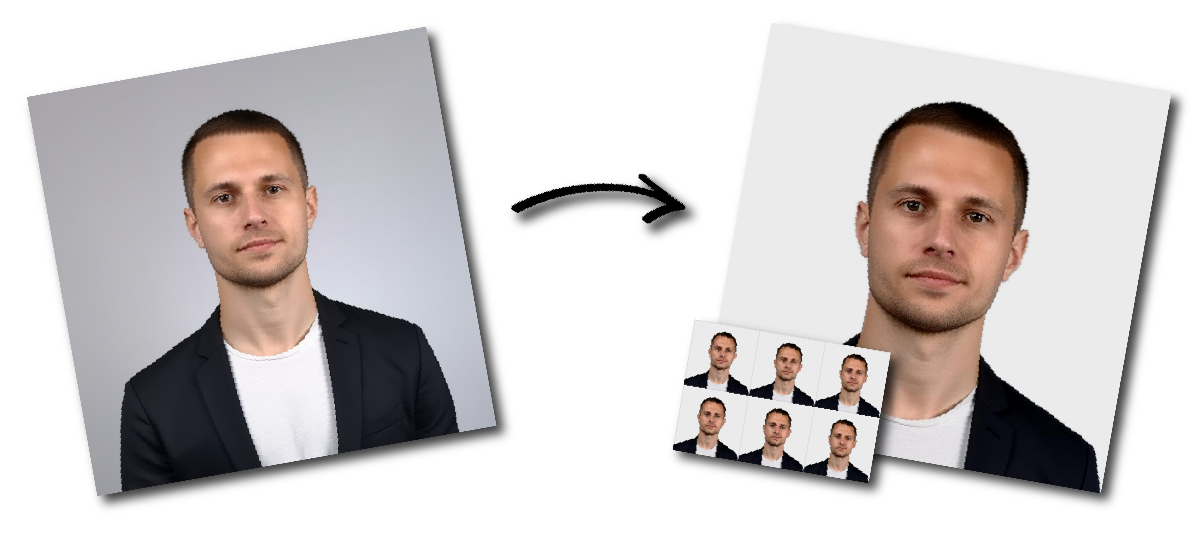

Don't worry about the size requirements. Our tool will automatically create correct United States Citizenship photos for you.
US Citizenship Photo Requirements
Photo Basics
Pose & Appearance
Other Important Rules
With our US passport photo maker, you can generate your 100% compliant photo with only 3 steps:
Use a smartphone or digital camera and take the picture in front of a plain white or off-white background. Face the camera directly and keep your entire head visible.
Use the original camera image rather than a screenshot, social-media image or previously compressed copy.
Upload the original photograph to the our US citizenship photo tool.
The tool will help:
You may download both digital US Citizenship photo for online submission and printable photo template.
Stand in front of a smooth white or off-white wall.
Stand several feet away from the wall to reduce shadows behind your head.
Place the smartphone or camera at approximately the same height as the applicant’s eyes.
Do not hold the camera significantly above or below the face. Avoid taking the photo as a close-range selfie because a wide-angle phone lens may distort facial proportions.
Ask another person to take the picture or use a tripod and timer.
Keep your head upright and look directly into the camera.
Your shoulders should face forward. Do not:
Leave sufficient space around the head and shoulders.
Natural daylight from a window can work well, provided the light falls evenly across the face.
5.Use the Highest Available Image Quality
Clean the camera lens and select the camera’s highest quality setting.
Hold the camera steady and focus on the applicant’s eyes. The final image should not be blurry, pixelated, grainy or overexposed.
Wear normal everyday clothing that contrasts with the background.
Avoid:
Jewelry and facial piercings may generally remain in place as long as they do not hide any part of the face.
Eyeglasses, sunglasses and tinted glasses should be removed.
When glasses cannot be removed for medical reasons, follow the current official instructions concerning medical documentation. The frames must not cover the eyes, and the lenses must not create glare.
Do not place glasses on top of your head for the photograph.
A head covering may be worn for a documented religious or medical reason.
The full face must remain visible from the bottom of the chin to the top of the forehead. The covering must not cast shadows or obscure any facial features.
Follow the current form instructions regarding any signed religious or medical statement that may be required.
Remove headphones, wireless earbuds and hands-free devices before taking the photograph.
1. Download the 4R sheet from our passport photo maker containing multiple photos.
2. Check the printing requirements and select the appropriate 4R photo paper.
3. Print the sheet borderless, ensuring that the image fits the 4R photo paper exactly.
4. Once printed, cut along the grey lines to separate the individual photos.
Form N-400 is used to apply for naturalization.
Applicants living in the United States should follow the biometric services instructions issued by USCIS.
Do not assume that two printed photographs must be mailed with every N-400 application. Attend any biometric services appointment scheduled by USCIS and follow the instructions in the appointment notice.
Applicants filing Form N-400 from outside the United States under an applicable naturalization provision generally need to submit two identical color passport-style photographs.
Write the applicant’s name and Alien Registration Number on the back only when the current USCIS instructions direct you to do so. Use a pencil or felt-tip pen lightly enough that the photograph is not damaged.
Form N-600 is used to request a Certificate of Citizenship.
USCIS generally schedules applicants living in the United States for an appointment at a local Application Support Center to collect a photograph and signature.
Follow the appointment notice rather than submitting unsolicited photographs.
Applicants residing outside the United States must generally provide two identical, recent color passport-style photographs.
Check the latest Form N-600 instructions for labeling and submission requirements.
Form N-600K is used for certain children who regularly reside outside the United States and are applying for citizenship and issuance of a certificate under INA Section 322.
The supporting evidence generally includes two passport-style photographs of the child.
Because the application concerns a child, make sure:
Review the current Form N-600K instructions carefully because the application has additional eligibility, evidence, interview and age requirements unrelated to the photograph.
The “two photos” rule does not apply in the same way to every citizenship application. First determine which form you are filing and where the applicant lives.
A photograph may be 2×2 inches but still be unacceptable if the head is too large or too small.
The head should measure between 1 inch and 1⅜ inches from the chin to the top of the head.
Blue, gray, patterned or textured backgrounds do not meet the passport-style standard.
A white brick wall is also unsuitable because its texture and lines remain visible.
Do not use:
Cropping and resizing should not alter the applicant’s natural appearance.
A close selfie can distort the size of the nose, forehead and other facial features. Position the camera several feet away and use another person, a tripod or a timer.
Standing directly against a wall often creates a visible shadow. Move away from the background and use even frontal lighting.
Keep both eyes open and clearly visible. Use a neutral expression or a natural smile with the mouth closed.
Remove glasses before taking the photograph unless there is a documented medical reason that prevents removal.
Printing software may automatically enlarge or shrink the image. Disable automatic scaling and measure the final print.
Not every N-400 applicant needs to mail two photographs. Applicants living in the United States generally follow USCIS biometric services instructions. Certain applicants filing from outside the United States must submit two identical color passport-style photographs.
Applicants living in the United States are generally scheduled for an Application Support Center appointment. Applicants living outside the United States generally submit two identical recent passport-style photographs.
The Form N-600K supporting-evidence guidance generally requires two passport-style photographs of the child.
The finished printed photograph should measure 2×2 inches, or 51×51 mm.
The distance from the bottom of the chin to the top of the head should be between 1 inch and 1⅜ inches, or approximately 25–35 mm.
Yes. Use the highest image-quality setting, clean the lens, position the camera at eye level and ask another person to take the photograph. Avoid a close-range selfie.
A neutral expression is the safest option. A natural smile may be acceptable when both eyes remain open and the mouth is closed. Avoid exaggerated expressions.
Glasses should normally be removed. Follow the current official instructions when they cannot be removed for a documented medical reason.
A head covering may be worn for a documented religious or medical reason, provided the full face is visible and there are no shadows.
You should take the original photograph against a plain white or off-white background. Do not rely on digital background replacement, particularly when it changes the outline of the head, hair, face or neck.
Yes. Current passport-photo guidance permits matte or glossy photo-quality paper.
No. Pixel dimensions describe the digital image, while USCIS passport-style requirements concern the final physical print and the size of the head within it.
Use a recent color photograph taken within the last six months that accurately reflects the applicant’s current appearance.
Only when it was taken within the required period and still accurately reflects your current appearance. Taking a new photograph is generally safer.
USCIS may request another photograph, schedule a biometric services appointment or delay processing while the issue is corrected.
Before submitting or printing your photograph, confirm that: