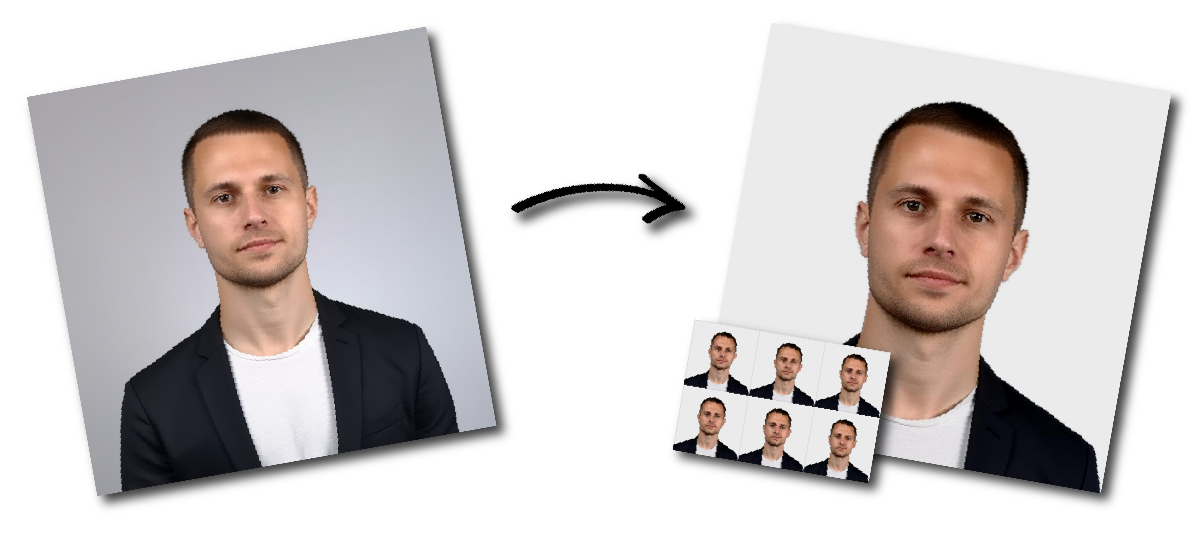

Don't worry about the size requirements. Our tool will automatically create correct Ireland Visa photos for you.
Ireland Visa Photo Requirements at a Glance
| Requirement | Ireland visa-photo specification |
|---|---|
| Number of photographs | Two identical photographs |
| Photograph type | Printed colour photograph |
| Width | 35–38 mm |
| Height | 45–50 mm |
| Face size | 70–80% of the photograph |
| Framing | Close-up of the face and top of the shoulders |
| Photo age | Less than six months old |
| Background | Plain white or light grey |
| Expression | Neutral |
| Eyes | Open and clearly visible |
| Mouth | Closed |
| Paper | Photographic paper |
| Reverse | White and unglazed |
| Glasses | Clear glasses may be worn when the eyes remain visible |
| Head covering | Permitted for religious reasons when the full face is visible |
| Back of photographs | Add the required applicant and AVATS information |
| Submission | Place with the supporting documents; do not staple to the form |
An Irish visa photograph must fall within the following size range:
Minimum: 35 mm wide × 45 mm high
Maximum: 38 mm wide × 50 mm high
The photo does not have to be exactly 35 × 45 mm. Any size within the official width and height ranges may be accepted, provided that the face, background and image-quality requirements are also satisfied.
Suitable print sizes therefore include:
35 × 45 mm
36 × 47 mm
37 × 49 mm
38 × 50 mm
Do not use an image measuring less than 35 × 45 mm or more than 38 × 50 mm.
Both photographs must show a close-up of your face and the top of your shoulders.
For correct framing:
Centre your head in the photograph.
Show your complete face.
Include the top of both shoulders.
Look directly at the camera.
Keep your head straight.
Do not tilt your head.
Do not turn your face to either side.
Do not crop off the chin or top of the head.
Keep the facial area large enough to occupy 70–80% of the image.
The facial measurement normally extends from the bottom of the chin to the top of the head. Hair above the natural top of the head should not determine the facial measurement.
The background must be:
Plain white, or
Plain light grey
It must provide good contrast with your face, hair and clothing.
Do not use:
Cream backgrounds
Dark backgrounds
Patterned wallpaper
Curtains
Doors with visible panels
Tiles
Furniture
Shelves
Pictures
Plants
Textured walls
Visible corners
Other people or objects
There must be no shadows or glare on the background.
The current page should remove cream from its list of accepted background colours because the official visa-photo guidance specifies plain white or light grey.
Use a neutral expression.
You must:
Keep both eyes open.
Keep your mouth closed.
Look directly into the camera.
Keep your face relaxed.
Avoid squinting.
Keep hair away from your eyes.
Do not:
Smile
Frown
Raise your eyebrows noticeably
Open your mouth
Show your teeth
Turn or tilt your head
Use an exaggerated expression
The official guidance states that applicants must not squint, frown, smile or use another expression.
Your head must be centred and upright.
Make sure that:
Your face points directly towards the camera.
Both sides of your face are equally visible.
Your shoulders are level.
Your head is not tilted upwards or downwards.
Your head is not leaning to either side.
Your face is not turned away from the camera.
A photograph taken from above, below or from the side may not meet the requirements.
Both eyes must be open and clearly visible.
Make sure:
Hair does not cover either eye.
Long fringes are moved away from the eyes.
The eyes are not hidden by shadows.
The photograph is sharp enough to show the eyes clearly.
Eyeglass frames do not cover the eyes.
Hair may cover parts of the forehead or ears, but it must not prevent the face and eyes from being identified.
You may wear your normal clear glasses when your eyes remain clearly visible.
Your glasses must not:
Have tinted or coloured lenses
Create glare
Reflect the camera or lighting
Cover the eyes
Cast strong shadows
Distort the appearance of your eyes
Sunglasses and tinted glasses are not permitted.
Removing glasses is usually the safest option because reflections may not be obvious until the photograph is printed.
Do not wear a hat, cap, headband or other head covering.
A head covering may be worn for religious reasons, provided that the face remains clearly visible.
The covering must not:
Cover the eyes
Cover the nose
Cover the mouth
Cover the chin
Hide the facial outline
Cast shadows across the face
The general Irish visa-photo page specifically identifies religious reasons. Do not automatically add a medical-head-covering exception unless the applicant’s visa office confirms that it applies.
Wear ordinary clothing that contrasts with the background.
For a clear photograph:
Choose a medium or dark top against a white or light-grey wall.
Keep collars and scarves below the chin.
Avoid large hoods.
Avoid clothing that blends into the background.
Keep the top of the shoulders visible.
Use soft, even lighting across the entire face.
The photograph must have:
Sharp focus
Correct exposure
Good colour balance
Natural skin tones
Good contrast with the background
No red-eye
No glare
No shadows on the face
No shadows on the background
Natural daylight can work well when you face a window. Do not stand with the window behind you, as this may make your face too dark.
Avoid direct sunlight, strong overhead lighting and a single bright lamp placed to one side.
The photographs must be printed on photographic paper.
The reverse of each photograph must be:
White
Unglazed
A visa application must generally include two identical passport-sized photographs.
Both photographs must:
Show exactly the same image.
Be in colour.
Be less than six months old.
Meet the size and quality requirements.
Contain the required information on the reverse.
The two photos should be printed from the same image rather than taken at different times.
Specific Irish employment, study and family visa checklists also require two recent colour passport photographs.
A modern smartphone can produce a suitable image when used carefully.
For the best result:
Ask another person to take the photograph.
Use the rear camera when possible.
Clean the camera lens.
Position the phone at eye level.
Hold the phone directly in front of the applicant.
Do not use digital zoom.
Turn off portrait mode.
Turn off beauty filters and face retouching.
Use even lighting.
Keep the phone steady.
Save the original full-resolution image.
Crop a copy for printing.
A handheld selfie is not recommended.
Selfies frequently cause:
Facial distortion
Incorrect camera angles
Uneven shoulder position
The face to appear too close
Poor centring
Uneven lighting
Difficulty achieving the required 70–80% facial area
Ask another person to take the photograph from directly in front of you. A tripod can help keep the camera steady, but another person should check the pose and framing.
Avoid editing that changes your natural appearance.
Do not use tools that:
Smooth the skin
Change facial features
Reshape the jaw or nose
Enlarge the eyes
Change eye colour
Alter the hairline
Remove facial marks
Add makeup
Whiten teeth
Create artificial facial detail
Distort the proportions of the head
Cropping and resizing should preserve the original appearance.
You can print the photographs:
At a professional photo shop
At a visa-photo service
Using a photo kiosk
At home with a photo-quality printer
Before printing:
Select a permitted photo size.
Place multiple copies on a standard print sheet.
Disable automatic “fit to page” scaling.
Print at 100% or actual size.
Use photographic paper.
Check that the reverse is white and unglazed.
Cut along the outer borders carefully.
Do not rely only on the size shown on a computer screen. Always measure the physical prints after printing.
Photographs may cause delays when:
Fewer than two photographs are submitted.
The two photographs show different images.
A photograph is less than 35 mm wide.
A photograph is more than 38 mm wide.
A photograph is less than 45 mm high.
A photograph is more than 50 mm high.
The photograph is more than six months old.
The background is not plain white or light grey.
The background contains patterns or objects.
The photograph is blurred.
The photograph is too dark or too bright.
Skin colour appears unnatural.
Red-eye is visible.
Shadows appear on the face or background.
The head is tilted or turned.
The applicant is smiling or frowning.
The mouth is open.
The eyes are closed.
Hair covers the eyes.
Tinted or coloured glasses are worn.
Glare prevents the eyes from being seen.
A non-religious head covering is worn.
The photograph is printed on ordinary office paper.
The reverse is glazed or coloured.
The required information is missing from the back.
The photographs are stapled to the form.
Two printed colour photographs
35–38 mm wide
45–50 mm high
Face occupies 70–80%
Close-up of the face and upper shoulders
Plain white or light-grey background
Information written on the reverse
Original digital colour photograph
JPEG format
Minimum 715 × 951 pixels
Maximum file size of 9 MB
Head-to-mid-torso framing
Uploaded electronically
An Irish visa and an Irish employment permit are separate applications.
The visa photograph accompanies an application for permission to travel to Ireland. It is normally submitted as two printed photographs with the visa application documents.
The employment-permit photograph is uploaded through the separate Employment Permits Online service and follows different digital dimension and format rules.
A person travelling to Ireland for employment may need both:
An Irish employment permit, and
An Irish employment visa, when their nationality requires one.
Do not reuse one application’s photo specifications automatically for the other.
The general photograph rules apply to Irish visa applications, including common short-stay and long-stay categories.
These may include:
Tourist and visit visas
Study visas
Employment visas
Join-family visas
Business visas
Conference and event visas
Transit visas
Exam visas
Volunteer visas
Specific visa categories or application offices may provide additional document instructions. Always check:
Your AVATS application summary
Your visa-category checklist
Instructions from the application office
Instructions from the relevant visa application centre
Current employment and study visa pages both require two recent colour photographs and direct applicants to the general visa-photo rules.
Some applicants may also be required to provide biometric information, such as fingerprints and a live-captured facial image, at a visa application centre.
Biometric collection is a separate part of the application process. Follow the instructions provided by the application office or visa application centre regarding whether an appointment is required.
Do not assume that a biometric appointment removes the requirement to include printed photographs unless your application office explicitly tells you so.
It must be between 35 and 38 mm wide and between 45 and 50 mm high.
No. That is the minimum permitted size. The photograph may measure up to 38 × 50 mm.
You must generally provide two identical colour photographs.
They must be less than six months old.
The face must occupy approximately 70–80% of the photograph.
It should show a close-up of the full face and the top of the shoulders.
Use a plain white or light-grey background.
Cream is not listed on the official Irish visa-photo requirements page. Use plain white or light grey.
No official 600-dpi minimum is published for Irish visa photographs.
A 300-dpi file can produce a high-quality print when it has sufficient pixels. DPI is a printing setting rather than the primary official visa requirement.
Yes. The general application process requires two printed passport-sized colour photographs with the supporting documents.
Use photographic paper. The reverse must be white and unglazed.
The official guidance does not state that the front must specifically have a matte finish.
No. Maintain a neutral expression and keep your mouth closed.
Normal clear glasses may be worn when the eyes remain fully visible and there is no glare. Sunglasses and tinted or coloured glasses are not allowed.
Yes, provided that your entire face remains clearly visible.
No. Non-religious hats, caps and head coverings should be removed.
Hair may cover part of the forehead, but it must not cover the eyes.
Yes, provided that the finished printed photographs meet every official requirement.
Ask another person to take the photograph. A handheld selfie can distort the face and make correct framing difficult.
The general rules require the applicant’s name and visa application or transaction number. Some category-specific instructions ask applicants to sign their name and add the AVATS transaction number. Follow your visa checklist.
No. Place them with the application documents without stapling or attaching them to the form.
Visa applications generally require two photographs of the applicant. Check with the application office when a young child cannot meet a pose or expression requirement.
Some centres may offer photo or biometric services, but availability varies. Check your application-centre instructions before attending.