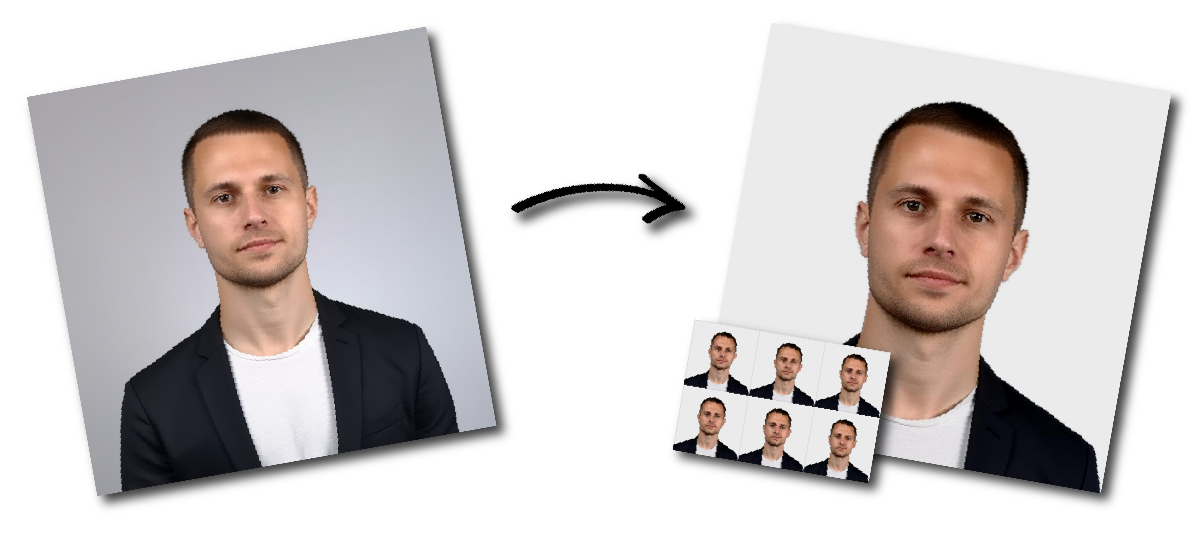
Make Ireland SPSV Driver Licence / Taxi Licence Photo Online

Upload a photo to start or choose another document.

how_it_works

Ireland SPSV Driver Licence / Taxi Licence Photo Requirements

Sample Photo
Photo Print Size:
7×10 cm
Head size:
Head must occupy 70 to 80% of the photograph measured from the bottom of the chin to the top of the head
Background color:
White
Resolution:
≥300 dpi
Paper type:
Matte
Digital Photo Size:
1653×2362 pixels

Don't worry about the size requirements. Our tool will automatically create correct Ireland SPSV Driver Licence / Taxi Licence photos for you.

Ireland SPSV Driver Licence Photo Requirements

Prepare photographs for a new or renewed Irish Small Public Service Vehicle driver licence. This is the licence required to work as a taxi, hackney or limousine driver.

You need three identical passport-standard photographs, each measuring approximately 10 cm × 7 cm and showing your head and shoulders. In portrait orientation, this is normally understood as approximately 7 cm wide and 10 cm high. The printed photographs are submitted with your SPSV driver licence application to An Garda Síochána.


SPSV Driver Licence Photo Requirements at a Glance

RequirementSpecification
Number of photos Three identical photographs
Official size wording Approximately 10 cm × 7 cm
Portrait dimensions Approximately 70 mm wide × 100 mm high
Submission format Printed photographs
Framing Head and shoulders
Photo standard Must meet passport-photo standards
Background Plain light grey, white or cream
Expression Neutral, mouth closed
Head position Upright and facing the camera
Glasses Permitted when the eyes remain visible and there is no glare
Head covering Permitted for religious or medical reasons when the full face remains visible
Image editing Digital enhancement or facial alteration should not be used
Paper High-resolution, photo-quality paper
Reverse White and unglazed
Online upload No standard online photo upload is specified
Application location Local Garda station, or the Carriage Office for applicants in Dublin

The NTA requires the photographs for both new applications and renewals.


Head Size and Framing

The NTA requires the photographs to show your head and shoulders

For correct framing:

  • Position your head near the centre.
  • Show your complete head.
  • Keep your chin fully visible.
  • Include both shoulders.
  • Leave visible space above your head.
  • Leave space between your shoulders and the edges.
  • Face the camera directly.
  • Do not stand so close that your head is tightly cropped.
  • Do not stand so far away that your facial features are difficult to identify.

Background Requirements

Because SPSV photographs must meet passport standards, use a completely plain:

  • Light-grey background
  • White background
  • Cream background

The background should contrast with your face, hair and clothing. There must be no shadows behind your head.

Avoid:

  • Patterned wallpaper
  • Doors with visible panels
  • Curtains
  • Tiles
  • Furniture
  • Plants
  • Shelves
  • Pictures
  • Visible wall corners
  • Other people or objects

Facial Expression and Head Position

Use a neutral expression and look directly into the camera.

You should:

  • Keep both eyes open.
  • Keep your mouth closed.
  • Keep your head straight.
  • Keep your shoulders level.
  • Look directly at the lens.
  • Keep hair away from your eyes.
  • Ensure your full facial features are visible.

Do not:

  • Smile
  • Frown
  • Open your mouth
  • Tilt your head
  • Turn your face
  • Look above or below the camera

Glasses

Transparent glasses may be worn when:

  • Both eyes remain fully visible.
  • The frames do not cover any part of the eyes.
  • There is no glare on the lenses.
  • The glasses do not cast shadows.
  • The lenses are not dark.

Sunglasses and dark glasses should not be worn.

Head Coverings

A head covering may be worn for religious or medical reasons, provided that all facial features remain clearly visible.

The covering must not:

  • Cover the eyes
  • Hide the nose
  • Cover the mouth or chin
  • Obscure the facial outline
  • Cast shadows across the face

Hats, caps and decorative head accessories worn for other reasons should be removed.

Clothing

Wear normal clothing that contrasts with the background.

Avoid:

  • White clothing against a white background
  • Large hoods
  • Scarves covering the chin
  • Civil or military uniforms
  • Clothing bearing official insignia
  • Clothing that obscures the neck or facial outline

Irish passport standards prohibit uniforms and clothing bearing insignia.

Lighting and Image Quality

The photograph must clearly identify you.

Use soft, even lighting and ensure:

  • The face is in sharp focus.
  • The photograph is correctly exposed.
  • Skin tones appear natural.
  • Both sides of the face are evenly lit.
  • The background is evenly illuminated.
  • There is sufficient contrast between you and the background.

Avoid:

  • Shadows on the face
  • Shadows behind the head
  • Red-eye
  • Flash glare
  • Motion blur
  • Pixelation
  • Overexposure
  • Underexposure
  • Strong colour casts
  • Excessive sharpening
  • Heavy JPEG compression

Current passport standards require sharp focus, correct exposure, natural skin tones and no red-eye or shadows.

Photo Paper and Print Quality

Print the photographs on high-resolution, photo-quality paper.

The reverse of each print should be:

  • White
  • Unglazed

The photographs should contain no:

  • Ink marks
  • Creases
  • Folds
  • Scratches
  • Print lines
  • Stains
  • Damaged corners

How Recent Should the Photo Be?

Use a new photograph taken within the last six months so it accurately reflects your current appearance and aligns with current passport-photo standards.

How to Take an SPSV Driver Licence Photo With a Phone

  1. Select the correct photo format.
  2. Upload a recent photograph taken by another person to our passport photo tool
  3. Download the prepared JPEG for an online application or the print layout for a paper application.

The Irish Passport Service instructs applicants to have another person take the photograph and not use a selfie or digital zoom. Because the NTA requires SPSV photos to meet passport standards, following the same approach is safest.


How to Print the Photos

You can print the photographs through:

  • A professional photographer
  • A pharmacy or photo shop
  • A photo kiosk
  • An online printing service
  • A home photo printer


Common Reasons an SPSV Photo May Be Unsuitable

A photograph may need to be replaced when:

  • Fewer than three copies are supplied.
  • The three prints are not identical.
  • The photographs are ordinary 35 × 45 mm passport size.
  • The prints are substantially different from approximately 7 × 10 cm.
  • The head or shoulders are cropped.
  • The applicant is difficult to identify.
  • The head is tilted or turned.
  • The applicant is smiling.
  • The mouth is open.
  • The eyes are closed or covered.
  • Hair covers the eyes.
  • Glasses create glare.
  • Dark glasses are worn.
  • The background is patterned or cluttered.
  • Shadows appear on the face or background.
  • The photograph is blurred or pixelated.
  • The print has unnatural colours.
  • The image has been digitally altered.
  • The photograph is marked, folded or creased.
  • The paper quality is poor.
  • The reverse is coloured or glazed.
  • Different photographs are submitted.

Frequently Asked Questions

What size is an Irish SPSV driver licence photo?

Each photograph should measure approximately 10 cm × 7 cm. In portrait orientation, prepare it at about 7 cm wide by 10 cm high.

How many photos do I need?

You need three identical photographs for a standard new or renewed SPSV driver licence application.

Does the photo have to be exactly 7 × 10 cm?

The NTA describes the measurement as approximate. Aim to print it as close as possible to 70 × 100 mm.

Is this the same as a normal passport photo?

No. An ordinary printed Irish passport photo is much smaller. The SPSV photograph uses passport standards for appearance and quality but has an approximately 7 × 10 cm print size.

Can the background be light grey or cream?

Yes. Current Irish passport standards permit a completely plain light-grey, white or cream background with sufficient contrast.

Can I smile?

No. Use a neutral expression and keep your mouth closed.

Can I wear glasses?

Yes, when your eyes remain visible and the lenses contain no glare. Dark glasses are not permitted.

Can I wear a religious head covering?

Yes, provided that all facial features remain clearly visible.

Can I use a selfie?

Ask another person to take the photograph. This reduces distortion and is consistent with current Irish passport-photo guidance.