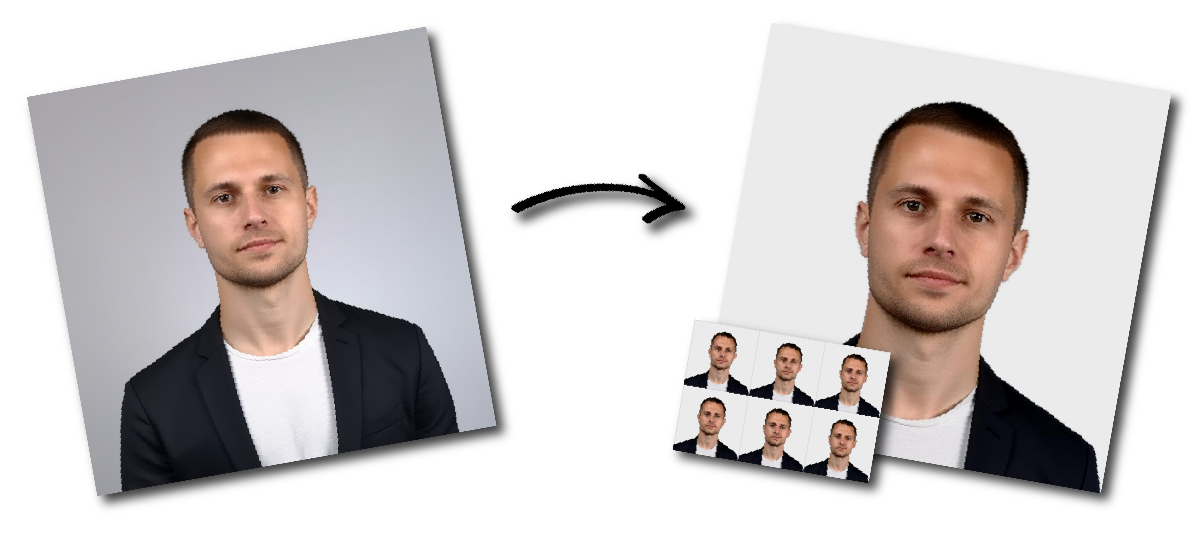

Don't worry about the size requirements. Our tool will automatically create correct Australia Passport photos for you.
Australian Passport Photo Online: Size and Requirements
Create an Australian passport photo online from a recent picture taken with your phone or camera. Upload your image and our passport photo maker will generate a 100% compliant 35 × 45 mm Australia passport photo.
Your printed Australian passport photos must be:
| Requirement | Australian passport-photo specification |
|---|---|
| Photo width | 35–40 mm |
| Photo height | 45–50 mm |
| Face height | 32–36 mm from the bottom of the chin to the crown |
| Photo age | Less than six months old |
| Colour | Natural, accurate colour |
| Background | Plain white or light grey |
| Expression | Neutral, with the mouth closed for anyone aged three or older |
| Eyes | Open and looking directly at the camera |
| Head position | Straight, centred and not tilted |
| Glasses | Not permitted unless they cannot be removed for medical reasons |
| Printing process | Dye-sublimation printing, not inkjet |
| Paper | Heavy-weight glossy paper of at least 200 gsm |
| Editing | No facial retouching, filters or other alterations |
The Australian Passport Office requires two good-quality printed photos with an application.
Choose a clear, high-resolution image taken within the last six months. Use the original image from your phone or camera rather than a screenshot, compressed copy or photo downloaded from social media.
Our AI tool will automatically detect your face and position it inside the crop bar. We also provide a manual adjustment option so you can fine-tune the placement. Move the crop bar until you are satisfied.
Download both a digital photo for online submission and a printable photo template.
The quality of the original photo plays a big role in whether the final image will meet the requirements. Cropping alone won’t fix issues like blur, distortion, shadows, or an incorrect expression.
Where possible, ask another person to photograph you or use a tripod and camera timer. Avoid holding the camera at arm’s length because close-range photographs can distort facial proportions.
Position the camera directly in front of your face at approximately eye level. Do not photograph your face from above, below or from an angle.
Keep your head upright and face the camera straight on. Do not tilt or turn your head.
Your eyes must be open and directed toward the camera. Keep a neutral expression and close your mouth unless the subject is a child under three years old.
Light the face evenly from the front. Avoid:
Strong overhead lighting
Direct flash reflections
Shadows behind the head
Dark shadows under the eyes
Bright light on only one side of the face
Overexposed or washed-out skin tones
Your natural skin tone must remain visible.
Our passport photo tool can remove the background automatically.
Do not frame the original image too tightly. Leave space above the head and around the shoulders so the picture can be cropped without cutting off the hair, chin or sides of the face.
Upload the original photograph whenever possible. Do not use:
Screenshots
Blurry or grainy images
Images saved from messaging applications
Scans of existing photographs
Social-media profile pictures
Images with beauty filters
Heavily compressed files
A photo may be rejected even when its outside dimensions are correct.
Common problems include:
The face must measure 32–36 mm from the bottom of the chin to the crown in the final printed photo. A face that is too close or too far away will not meet the requirement.
The crown means the top of the head itself, not necessarily the top of the hair.
Anyone aged three or older must have a neutral expression with the mouth closed. Even a subtle smile or raised eyebrow may affect the result.
The face must point directly toward the camera. Do not tilt the head up, down or sideways.
Glasses are not permitted unless they cannot be removed for medical reasons. Vision impairment by itself is not considered sufficient justification.
When glasses must be worn for medical reasons, the frames must not obscure the eyes and the lenses must not produce reflections.
Shadows on the face or background can interfere with biometric recognition. Both sides of the face should have consistent brightness and colour.
Do not smooth the skin, remove wrinkles, erase scars, change facial features, whiten teeth or use a beauty filter.
The photo must show your current natural appearance. The official guidance specifically prohibits retouching such as removing moles, wrinkles or scars.
Hair must not cover the eyes or obscure the visible edges of the face.
Australian passport photos must be produced using dye-sublimation printing on glossy paper of at least 200 gsm. Inkjet prints are not accepted under the published requirements.
The photo must be in focus and free from grain, red-eye, scanning lines, ink marks and other damage.
Children and babies must generally meet the same photograph-quality, positioning and background requirements as adults.
For children aged three or older:
The child must look directly at the camera.
Their eyes must be open.
Their expression must be neutral.
Their mouth must be closed.
For children under three:
Their mouth may be open.
No other person may be visible.
A parent’s hands must not appear.
Toys, dummies and other objects must not be visible.
The child’s face must remain clearly visible.
Place an infant on a plain light-coloured surface and photograph the child from directly above. Make sure the surface does not create folds, patterns or strong shadows.
Glasses must normally be removed.
They may remain on only when they cannot be removed for medical reasons. In that situation, the frames must not cover the eyes and there must be no reflection in the lenses.
A religious head covering is permitted when it is normally worn.
It must be plain and must not contain patterns, including small or subtle patterns. The entire face must be visible from the bottom of the chin to the top of the forehead, including the edges on both sides of the face.
Jewellery and piercings may remain when normally worn, provided they do not obscure the eyes, nose, mouth or any other facial feature.
Rings and studs must not create visible reflections.
A normally worn hearing aid is permitted for adults, children and infants.
Wireless earbuds and headphones are not considered hearing aids and must be removed.
You’ll need to submit two printed photos with your passport application, and they need to be produced to a high standard.
To meet the requirements, the photos should be printed using dye-sublimation on glossy, heavy-weight paper (at least 200 gsm). The colours should look natural, and the print itself should be clear, without any marks, streaks or damage.
Avoid using a standard home inkjet printer, as these usually don’t meet the official specifications.
When trimming the photos, make sure the final size stays within 35–40 mm wide and 45–50 mm high. Be careful not to cut into the head, hair or shoulders.
If you’re unsure, it’s usually best to have your photos printed by a professional passport-photo service or a reputable photo-printing shop.
A printed Australian passport photo must be 35–40 mm wide and 45–50 mm high.
The face must measure 32–36 mm from the bottom of the chin to the crown.
It does not have to be exactly 35 × 45 mm. The official accepted range is 35–40 mm wide and 45–50 mm high.
A 35 × 45 mm photo is within that range, provided all other facial positioning, image-quality and printing requirements are met.
A photograph taken at home may meet the technical requirements when it has correct lighting, framing, image quality and printing.
However, the Australian Passport Office recommends using an established professional passport-photo provider.
An arm’s-length selfie is not recommended. Taking a photograph from very close range can distort facial proportions.
Ask another person to take the picture or place the camera on a stable surface and use a timer.
Anyone aged three or older must have a neutral expression with their mouth closed.
Children under three may have their mouth open.
Glasses are not permitted unless they cannot be removed for medical reasons. When medically required, the glasses must not obscure the eyes or create reflections.
Use a plain white or light-grey background that contrasts with your face and hair.
There must be no patterns, objects, shadows or visible background editing.
No. Do not smooth the skin, remove blemishes, erase scars, change facial features or use filters.
The image must show your current natural appearance.
A normal home inkjet print does not meet the published requirements.
The photograph must be printed using dye-sublimation printing on heavy-weight glossy paper of at least 200 gsm.
The photograph must be less than six months old when submitted.
You need two good-quality photographs that meet the Australian Passport Office requirements.
The official guidance focuses on ensuring the entire face and the edges of the face are clearly visible. Hair, clothing or accessories must not obscure important facial features.
You may be asked to provide a new photograph when lodging the application or while it is being assessed. This may delay the application.